


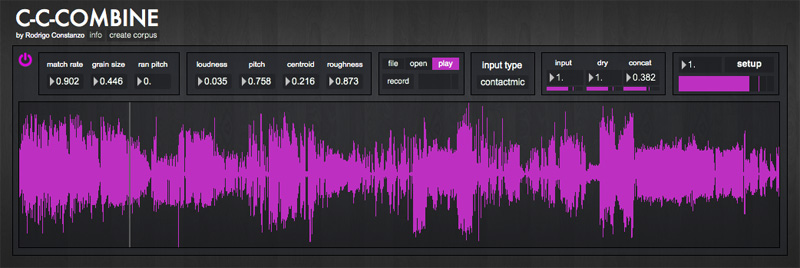
C-C-Combine is a corpus-based audio mosaicking application, built in Max, based on concatenative synthesis. Concatenative synthesis is a technique for synthesizing sounds by concatenating short samples of recorded sound. It is essentially a type of granular synthesis that, instead of playing back grains based on position/window parameters, plays back grains based on descriptor-based navigation, in this case happening through real-time audio analysis. In order to do this you must have a corpus (the pre-analyzed body of sounds) and an input sound source (either incoming audio or file playback).
Here is a video of it in action.
Back when I started programming what would eventually become The Party Van, I envisioned building something like C-C-Combine. It was very much out of my programming reach/understanding at the time. C-C-Combine is my first exploration into “full on” concatenative synthesis: one that uses a pre-analyzed corpus of samples. I was originally inspired to do this by collaborator Pierre Alexandre Tremblay, having heard his Sandbox #3 in action, which is based on CataRT, an open source concatentative synthesis application written by Diemo Schwarz. (You can read more about PA Tremblay’s concat setup/exploration in this paper.)
A central concern for Tremblay is the recycling of virtuosity, which in the case of Sandbox #3 comes in the form of the translation of instrumental gesture (on a fretless bass guitar) to a granular synthesis playback engine. For C-C-Combine, I wanted to build something that could map arbitrary input to arbitrary output. The video above shows C-C-Combine being used with a wide variety of input sources and corpora.
At the core of C-C-Combine is granular synthesis, which is well suited as a playback method for unusual corpora as it can emphasize the transients in the body of samples. When using sound sources such as circuit-bent toys or glitching CD players, there are many transient artifacts that are part of the short-circuiting process. In a circuit-bent toy this could be through faulty logic causing random access to memory or a laser ‘jumping the grooves’ in the case of a CD player. There is a sound to these glitches/transients and the granular synthesis can highlight them.
Since the corpora is made up of very short audio segments (definable between 20-100ms at the time of analysis) this means that when using a corpus containing circuit-bent or glitching sources a high density of glitch is present in the samples. This glitch-ness is something that can really come across, sometimes, with certain types of input audio, even more so than the non-glitch contents of the samples. Depending on the input source this can push the glitch into the territory of Microtemporal Fusion where “human perception reaches attentional limits where microevents occur too quickly in succession to be heard as discrete events”, as described by Curtis Roads in this book. This means that one can literally articulate and perform with the sound of glitch.
Aside from the desire to learn to code something that did exactly what I wanted, the impetus for creating C-C-Combine was that this type of synthesis and sound production is difficult to get into. CataRT is freely available, but it requires installing a large framework/extension on top of Max/MSP (FTM&Co). Mogees, another system for concatenative synthesis by Bruno Zamborlin, seemed easy to use, but the code was not openly available. C-C-Combine is freely available to download (link below) as a Max/MSP patch, so that you can edit/view the code (or use it as is). It only uses a few externals by Alex Harker, which come included with the download. Harker’s externals handle the audio analysis (both real-time and offline) as well as data storage/lookup.
I made every effort to make the application as user-friendly as possible with a thorough “quick start” guide in the ‘info’ window and ‘hints’ when you hover over anything. Corpus analysis/storage/loading is no trivial task, but it doesn’t have to be difficult either. The program is primarily made for real-time audio mosaicking, so most of the features are built towards that end, but I do plan on expanding the program, as well as building an adaptation of it into The Party Van.
CLICK HERE TO DOWNLOAD THE PATCH
Here are my own personal corpora (multiple corpuses) that you can download and use with the patch right away. Just drag the audio file onto the main window of C-C-Combine, then select the analysis file when it prompts you for it.
How much MAX do you need to run it? Looks like MAX runtime is free…
It will run on the runtime.
AWESOME!!!
great !
it’s great ! thanks a lot for sharing this.
I’ve been on the beta list of mogees, and all that I can say is that it’s far from being “user friendly” at all.
you seem to play the piano really well too
Great work, thanks for sharing Rodrigo, bests.
Wow, amazing work! Love the glitch-painting segment. Thanks for sharing!!!
WHOA! This slays. I got it set up to play ruined metal percussion based on the noise of my computer’s keyboard. I could type forever. Very, very nice work – thanks!!!
i would like to stream combine to ableton but when i start it up with max 6 runtime, it immediately kills ableton’s connection with my usb to midi interface which is handling something else. is it just my setup (os x 10.6, live 8.3.4)? tried turning off overdrive but no use, have to restart ableton or macbook pro.
great work!
That’s weird. It might be that both are trying to get hold of the same MIDI controller or something. I’ve not had any experiences with Ableton though, so I’m not really sure.
Maybe try starting up Combine first, and then Ableton?
As a last resort you can just record the audio directly in Combine and import it into Live afterwards. Not ideal, but at least it’s something.
thanks for the quick response. i will try the same setup with the midi ports of an external firewire audio interface tomorrow. it could be due to unexpected issues with the midi to usb connection. i’ll tell you how it worked out.
Hi, I’m trying to get this to work as it looks and sounds very interesting. I can’t seem to find any information on how to get an analysis corpus out of an audio file though and what kind of data C-C-Combine expects within the corpus.
Is there a max patch/external that makes this process simple?
It’s built right into the patch. Click on “create corpus” at the top left and that has some instructions on how to go about making it. (You drag an audio file onto a window there and when it’s done analyzing it, it will prompt you to save the file).
The data the patch is creating (and expecting) is a text file that has entries for file length, window analysis size, how many analysis entries there are, the minimum, mean, and maximum for each parameter, then a (super long) list of the actual entries which are formatted to be : time, loudness, pitch, centroid, roughness;
You don’t have to deal with or think about that stuff at all, you just drag the file and the patch does the rest.
Here’s the start of one of my corpuses to give you an idea:
filename, data_noDC.wav;
duration, 322853.09375;
windowsize, 20;
units, 16140;
minmeanmax, -101.789291 -17.129576 0.640727 0. 104.866898 139.496353 67.134483 122.38839 133.072449 0. 0.02617 0.532681;
0, -79.599846 0. 107.66629 inf;
20, -57.059647 62.140152 107.069786 0.001713;
40, -21.915905 62.348877 117.077682 inf;
60, -14.169678 40.757439 119.684235 0.002578;
80, -14.843563 112.763077 122.251961 0.017995;
100, -21.602682 112.776871 116.721855 0.00102;
120, -24.025963 0. 120.109718 0.000712;
Aha, thanks very much Rodrigo for the quick response. I must have missed that button on the GUI.
I’m now getting the error message in the max window: “entrymatcher: entry does not exist” after being prompted to save the generated corpus.
Do you just see it once, or many times? Open up the setup window and turn on ‘audio interrupt’ and try again. It basically analysis everything, and dumps it into another object in order to save it to disk but it can run into problems as there tons of entries.
If that doesn’t make the problem go away, it should still work fine as it’s only the last couple entries that wouldn’t have gotten saved, but it should analyze/playback just fine.
It works! I still get lots of the same error message though, even with audio interrupt enabled.
Sounds great though!
That’s weird. It might be CPU/computer load specific. I had that occasionally with mine but audio interrupt fixed it.
Good to hear that it works though!
Working great, and is pretty easy to use. Thanks for sharing!
Max 5 or Max 6…?
It’s Max6. It should work in 5, though I’ve not tested it. As far as I can remember there isn’t any gen or other Max6 specific bits.
Hi
The C-C-Combine is very clever.
Thankyou for letting me view your patch I am sure it will be very instructive.
Geoff
I’m trying to analysis an input .wav but it goes straight to save but doesn’t load up the audio into the progress window. Is there anything obvious I should be doing?
Are you dragging it into the main window, or the ‘create corpus’ window? (Gotten to by pressing the ‘create corpus’ button).
What you described is what happens when you drag an audio file into the main window (as it prompts you to load the analysis file).
Also make sure you have audio/dsp turned on in the setup window.
Brilliant! I’ve been looking for something like this for ages. Thanks Rodrigo!
cheers, Dan
Glad you dig it. You guys make amazing sound libraries!
hi! how can i use the cccombine with midi input?
You can use MIDI learn, but it needs audio input to function.
If I did want to run this through Ableton how would I? I chose the ad_rewire driver like i read online should work but then c-c-combine stops working. I want to be able to route it to live to record it and further manipulate it. Thaks.
Hmm, not sure how to do that in Ableton. I don’t know/use Live at all.
Worst case scenario you can use the built-in record function to do what you want to do, and then dump it into Ableton?
I got it to work with soundflower, what a cool application. But now for some reason cccombine won’t work when the input is a file. I can hear the file if i put up the dry signal but concat isn’t doing anything.
Not sure. Maybe quit/restart max?
I am trying to use CCCombine with MaxRuntime 6.1.7 on my MacBook Pro (OSX 10.87.5)
When I drag the corpus file to be analyzed (a 8:46 min stereo Wav file) I don’t see any progress – it shows 0% and there is no prompt for analyzed text file to rename.
Any ideas?
If you have the full version of Max make sure the audio is turned on in the audio settings. Or if you don’t, open up the actual CCCombine patch and go into the SETUP window. Make sure audio is turned on. Then open the create corpus patch again and try dragging the audio.
Thanks for responding. I think my problem is that I had pulled the _Required Externals into the wrong location. When I placed it as directed it started analyzing immediately. Looking forward to having my trumpet sound like Ethel Merman. Epic – Thanks for your hard work!
This is great – just what I’ve been looking for. I was looking into CataRT and maybe Rich Contacts to start a new project, but here ‘right out of the box’ I was making music (clarinet + your glitchy drum corpus) within 30 minutes.
Very robust and very clear GUI. I’m going to keep playing with it: next up, get some of my samples up on there and play around with input (piezo/contact mics).
Thanks very much!
Glad it worked for you so easily! I found the same to be the case with other projects, hence why I rolled my own.
[…] improvisation by clarinettist Pete Furniss using C-C-Combine – a concatenative synthesis patch built by Rodrigo Constanzo in Max MSP. On his website, Rodrigo explains that concatenative […]
It is possible to make a Max4life version?
Not easily. I do plan on rebuilding some of my Max patches as M4L devices at some point though, so keep your eyes peeled.
[…] augmented clarinet: in this instance, I’m using Rodrigo Costanzo’s C-C-Combine in Max/MSP to create the effect of a virtual improvising partner […]
Hi Rodrigo,
Thanks so much for posting this! Looks like a terrific tool.
I’m having a problem:
When dropping a file in the “drag corpus here” field, it makes the analysis of the file but it doesn’t prompt me to save the analysis, it just freezes at 100%.
I am running on OSX 10.9.5 and have Max 7.
I tried the following:
– updating to latest Max version (7.0.6)
– different type of audio files (mp3, wav)
– opening Max in both 32 and 64 bit
– double checked that the external had been copied to Documents/Max 7/Packages/ (which I believe is the right location in Max 7)
Any ideas?
Help would be most welcome.
Thanks!!
Federico,
It should work fine in Max7, though I had built it in Max6. Can you try running the standalone “create corpus.maxpat” that comes in The Party Van to see if that works? (https://rodrigoconstanzo.com//the-party-van/)
Hi Rodrigo,
Thanks for you reply! That one didn’t work either.
I thought I’d take a look at the Console messages and so I have updates:
Short version: it looks like I’m missing the descriptors~ object.
Long version:
1) When I open create corpus.maxpat, this comes up in the Console:
newobj: descriptors~: No such object
newobj: descriptors~: No such object
newobj: descriptorsrt~: No such object
newobj: entrymatcher: No such object
If I click in “Show object”, indeed, the descriptors~ object is grayed (actually “browned”) showing it doesn’t exists as object.
I still dragged an audio file for analysis, but this time the analysis didn’t even start, it was frozen in 0%.
2) I went back and thought I’d look at the _Combine.maxpat. All of these came up in the Console:
newobj: descriptors~: No such object
newobj: descriptors~: No such object
newobj: descriptorsrt~: No such object
newobj: entrymatcher: No such object
newobj: descriptorsrt~: No such object
newobj: entrymatcher: No such object
waveform~: waveform~: unknown message tickmarkcolor
waveform~: waveform~: unknown message tickmarkcolor
and again, many of these would point to the same instances of descriptors~
I tried again to drop a file in the “drag a corpus” to see if something came up in the Console. Again, the percentage bar did go to 100% but no window popped up to save the result, and nothing was printed in the Console.
Thanks!!!
Federico
PS: is it possible to get notification of replies to this thread, I think I didn’t receive one for your last reply.
Update: it worked!
Looks like the search paths had to be edited. I thought Documents/Max 7/Packages/ was default but I had to add it using Options/File Preferences… (I discovered this by first copying the files to Documents/Max 7/Library/ and realizing it worked).
Once that was on, the Max Console put different kind of messages containing “wrong architecture” so I switched to 32-bit by pressing Cmd-I on the app icon and checking “Open in 32 bit mode”.
This means it is 32 bit only I guess?
Now to start using it!
I’m getting the same error messages as Federico, but changing file preferences doesn’t provide a fix for me. In fact, looking at the path list I can see that all the relevant subfolders are being searched, but it STILL doesn’t find the descriptors~ object, etc.
I’m running Windows 8 64-bit and Max 7.0.6
I wonder if it’s a Windows issue? The folder for Windows externals does mention that they’re beta…
I can’t wait to get playing with this. Got some bowed cymbal sounds I would like to play by whistling.
Ah, that could be it. As far as I know the externals are 32bit only. I’ll email you to see about troubleshooting the issue.
I have the same error as Nikita, is there a solution? I use Windows 10 64-bit
thank you
I got it make work with max 5, wonderful patch :)
Good to hear, and glad you got it to work!
[…] You can get more info or download the patch at Constanzo’s site. […]
Hello Rodrigo! I am trying to make this patch work on Max 7, but the analysis of Audio file doesn’t start… it shows the waveform of the file but stays at 0% of analyzing process. Do you have any advice how to fix this?
Jonas
It doesn’t work in Max7 unfortunately.
The good news is I’ve been working on a complete revamp of this which will available soon, which will be an improvement to every aspect of this.
Hey –
When will the MAX 7 update of this be ready!? Seems like such a ridiculously fun / inspiring tool!
Thanks for the heard work –
Sam
Hello Rodrigo, thanks a lot for sharing this and generally for your generosity. i’ve been reading some of your posts, it’s inspiring. Is this patch meant to work on max 8? I don’t get prompted to save a text file after analysis unfortunately…
Hello, Rodrigo. I’m chiming in to express my admiration for your work and C-C-Combine. It’s only taken me six years (!) to get around to committing to make it work, now in Max 8. I’m looking forward to your revamped version.
Hi there! This looks like superlative work. Thank you for sharing this.
I’m now working with Max 8 and I’m trying to make it work. Any one of you have already achieved this? Maybe Eric? In that case, could you share the patch?
Thanks!
At this point the old version is kind of abandoned. I’ve completely rebuilt it so it works in Max8 and M4L etc.. but I’ve not fully/properly released it yet (I want to make tutorials and demo videos etc…). You can download it here: https://rodrigoconstanzo.com/party/combinev1.0b_beta.zip / and see a vid of me explaining it here: https://www.youtube.com/watch?v=TL-L9weQxeM
Dear Rodrigo,
this is such a good project. Kudos! Thanks! I tried the beta version and I have to reopen it almost every day because it appeals to me so much. Let me know if you can use support with tutorials and beta testing. I also wanted to ask you if you want to show the Corpus Creator yet.
Best regards!
Any news for 64-bit compatibility? Thanks!
Hi Rodrigo. Just a quick note that Zamborlin’s website has been squatted and my anti-virus software had a tantrum when clicked the link in your text. Cheers!
Yikes, thanks for the heads up. I’ll break the link on that.
Any way to get this working on Max 8 64bit on windows? I guess the aHarker objects are only 32bit, right?
There are some beta 64bit ones out there, but only for Mac sadly. They will all eventually be ported over, but that’s been slow going.
Alright, thanks for replying so quickly.
I am trying your new amxd version but even on max 7 32bit I can’t install descriptors and entrymatcher, just realized that aHarker’s library is only for mac. Could you advice any solution to this?
It’s incredible how difficult it is to find a concat synth for Windows eheh
It should work ok on 32-bit Windows without you needing to do anything.
I’m trying to think, but I’m pretty sure I ‘baked in’ all the mac/windows externals when building the amxd.
Unfortunately it doesn’t. I just installed Max 7 32 bit latest version and I get 3 “no such object” errors, 1 for entrymatcher, 2 for descriptors~ (one in the subp audio analysis, the other in normLearning)
Gotcha. Yeah that sucks. Sadly without a Windows machine to test anything on, I’m always just guessing as to what will or will not work. Either way, the entrymatcher version that I have in the amxd is a more recent one than what is available for the 32-bit Windows version, so it probably wouldn’t work correctly anyways.
Thanks for sharing this amazing work .
where can i get the device for creating custom corpus files ? ..in the vid of you explaining the combinev1.0 live device you also show it in action . unfortunately its not included in the combinev1.0b_beta.zip / download
Great stuff here – just found your site and wanted to give a quick shout from 2024. Looks like you’ve been at it for years! Hope you’re still building creative things!